



3 MCP Commands That Give You a Complete AI Visibility Check in Under 5 Minutes
Most brands have no idea how they appear in AI answers. Not because the data doesn't exist, it does, but because nobody told them it was trackable, or how to do it without logging into a dashboard and clicking through reports.
If you have Reaudit connected to Claude Desktop via the MCP server, you can get the full picture in three plain language commands. Visibility score, brand mention breakdown, competitor comparison. The whole thing takes under five minutes.
Here's how it works.
What you need first
You need Claude Desktop with Reaudit's MCP server connected. The server is published as @reaudit/mcp-server on npm, install it once, authenticate through OAuth, and Claude Desktop can talk directly to your Reaudit account. No copy pasting data, no switching tabs. You just ask questions.
Once it's connected, these three commands give you a complete weekly snapshot.
Command 1 — Pull your AI visibility score
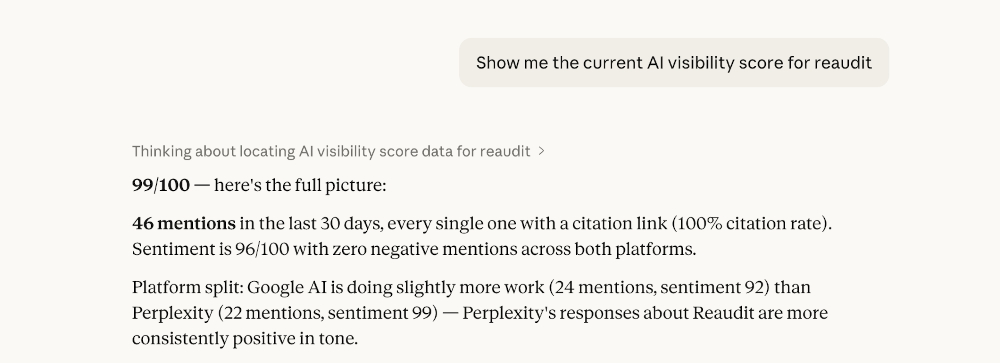
Ask Claude: "Show me the current AI visibility score for [your project]."
What comes back: your overall score across all tracked AI engines, a breakdown by platform, and a trend flag showing whether the score has moved since the previous week.
The score tells you the state of play quickly. If it's dropped, you know to dig into mentions before doing anything else. If it's held or improved, you move to the next command with context.
What the score actually measures: how consistently your brand appears in AI-generated answers across the engines Reaudit tracks, Google AI Overview, Google AI Mode, Perplexity, and ChatGPT on the Starter plan.
Command 2 — Get your brand mention breakdown
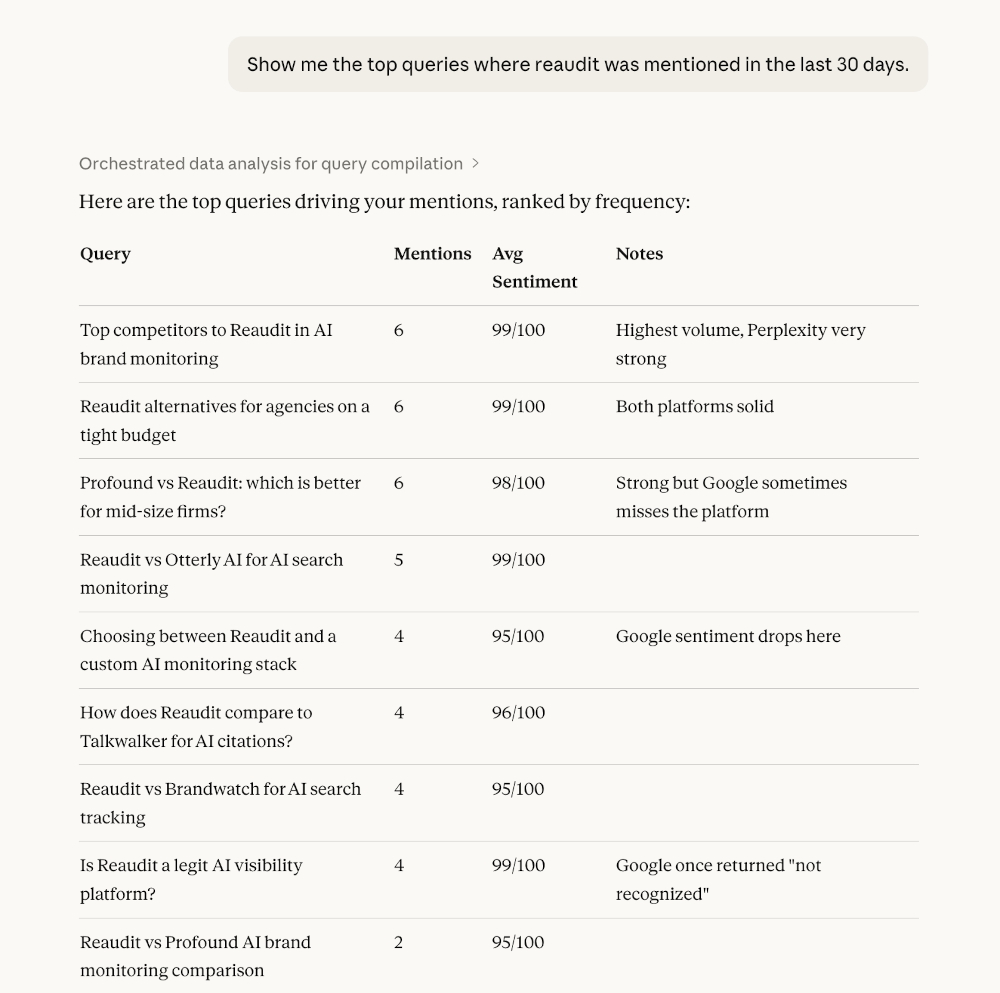
Ask Claude: "Show me the top queries where [your brand] was mentioned in the last 30 days."
What comes back: the specific prompts that triggered your brand appearing in AI answers, the platforms each mention appeared on, and the sentiment attached to each mention.
This is where most people get surprised. The queries that surface your brand are rarely the ones you optimized for. You might be appearing consistently on "what is [category]" questions but missing entirely from "best [category] tools for [use case]" — which is where buying intent actually lives.
Reading the mention breakdown tells you whether you're getting cited in the right context, not just cited at all.
Command 3 — Run the competitor comparison
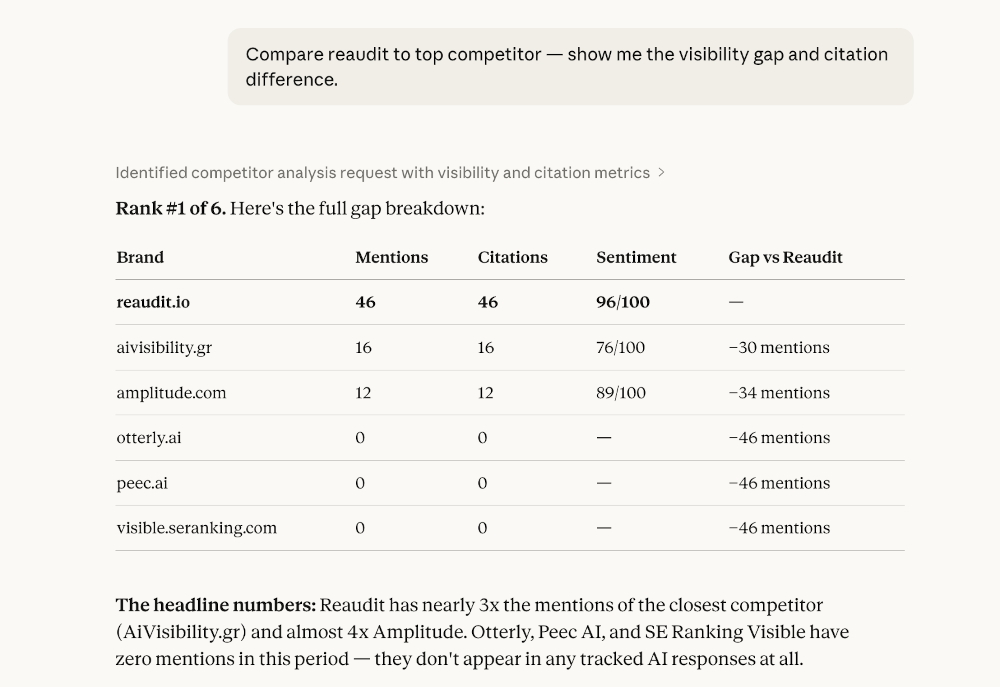
Ask Claude: "Compare [your brand] to [competitor] — show me the visibility gap and citation difference."
What comes back: side-by-side mention counts, sentiment scores, and citation rates for your brand and your competitors. If a competitor is outranking you, Reaudit surfaces the content themes where they're pulling ahead.
That last part is where the action is. Knowing you're behind isn't useful on its own. Knowing a competitor dominates "AI-driven analytics" queries — and you have nothing published on that topic — tells you exactly what to write next.
What to do with the output
Three commands, three data points. Together they answer: where do I stand, what's driving my mentions, and where am I losing to competitors?
A straightforward way to use this weekly: run all three on the same day, look for the pattern. If your score is down and mentions are thin, the problem is content, you need more pages that answer the questions AI engines are receiving in your category. If your score is fine but competitor citations are higher, the gap is usually schema and citation sources, the structure of your content matters as much as the topic.
From Claude Desktop/Cursor you can go straight from the diagnosis to the fix. Ask Reaudit to generate a content brief, create the article, apply schema markup, and publish to WordPress, all through the same MCP connection. The visibility check and the content response live in the same workflow.
Why this is different from checking a dashboard
A dashboard shows you numbers. The MCP connection lets you ask follow-up questions. After running the competitor comparison, you can immediately ask: "What content themes is [competitor] using that we aren't?" or "Which of my pages are AI bots crawling most frequently?" The conversation continues until you have something actionable, not just a report to close.
That's the actual difference. The data is the same. The ability to interrogate it in natural language, in context, without switching tools, that's what makes a weekly 5-minute check genuinely useful rather than something you do once and forget.
You can learn more about Reaudit's MCP server in our docs
FAQ
Do I need Claude Desktop specifically, or does this work with other MCP clients?
Reaudit's MCP server works with any MCP-compatible client. Claude Desktop is the most common setup, but Cursor and other clients that support the Model Context Protocol will work too.
How does authentication work?
The MCP server uses OAuth 2.0 with PKCE for authentication. When you first connect, you'll be directed through Reaudit's standard login flow, no API keys to manage manually.
Which AI engines does the visibility score cover?
The Starter plan covers Google AI Overview, Google AI Mode, Perplexity, and ChatGPT. The Enterprise plan tracks all 11 engines Reaudit monitors: those four plus Claude, Gemini, Microsoft Copilot, Meta AI, DeepSeek, Grok, and Mistral.
Can I add more commands beyond these three?
Yes. These three cover the core weekly check. Reaudit's MCP server has 92 tools in total, you can pull citation sources, check which pages AI bots are crawling, generate content, run GTM strategy steps, and publish directly to WordPress and social channels, all from the same connection.
How often should I run this check?
Weekly works for most brands. If you're publishing content actively or running a campaign, checking mid-week as well takes an extra two minutes and catches shifts before they compound.

Triantafyllos Rose Samaras
FounderTriantafyllos Rose Samaras is the founder and CEO of Reaudit, the pioneering AI Search Visibility Platform that helps businesses understand and optimize how they appear across AI search engines. Recognizing that 25% of online searches now happen through AI platforms like ChatGPT, Claude, and Perplexity, Triantafyllos identified a critical market gap: traditional SEO tools were completely blind to this new search paradigm. While companies invested millions in Google optimization, they had zero visibility into how AI systems perceived, cited, and recommended their brands. Reaudit was built to answer the question every modern business needs to ask: "How does AI see my brand?" Based in Greece, Triantafyllos is building a globally competitive AI company, proving that innovation can come from anywhere. He is passionate about helping businesses navigate the transition from traditional search to AI-powered discovery.